What is the SEAV LS 2102 Green Control Unit?
The SEAV LS 2102 Green control unit is a reliable solution for automating sliding gates and up-and-over garage doors. Designed to ensure energy efficiency, ease of configuration, and compliance with current European regulations, it offers advanced features for both residential and commercial installations.
Key Features of the LS 2102 Green
- Stand-by power consumption below 0.3 W
- Local programming via onboard buttons
- Remote configuration through the BW2356 Bluetooth/Wi-Fi interface
- Compatibility with the Seav BeTech app
- Storage of up to 150 radio codes
- Complete configuration backup to file
Programming Modes
Stand-Alone Programming
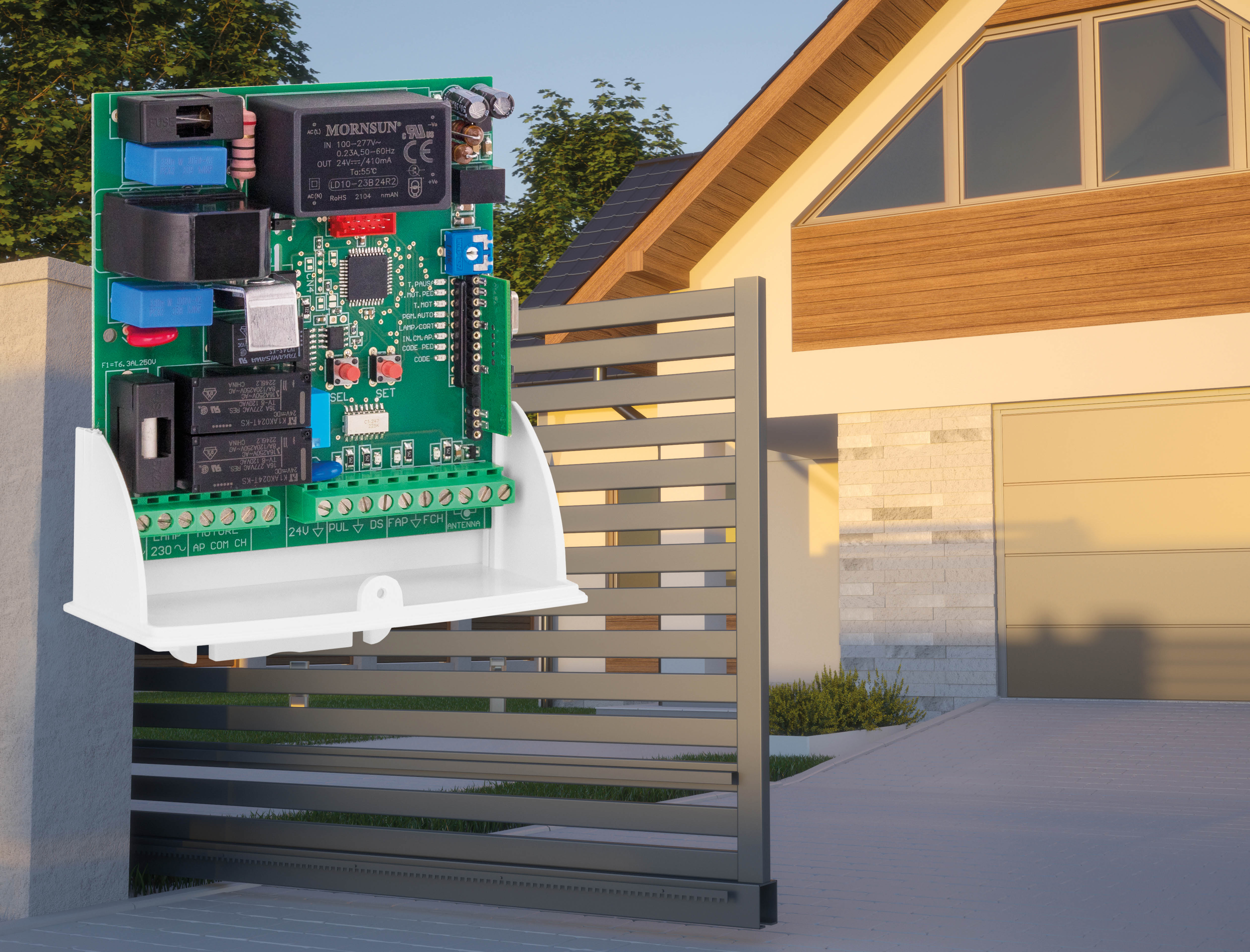
Configuration can be performed directly from the electronic control board using the SEL and SET buttons.
Programming via the Seav BeTech App
Using the optional BW2356 Bluetooth/Wi-Fi interface, all parameters can be managed directly from a smartphone or tablet.
Benefits of App Programming
- Faster setup and configuration
- Saving of installation settings
- Backup of stored remote controls
- Easy restoration in case of control unit replacement
How to Store Remote Controls on the SEAV LS 2102 Green
Programming Remote Controls for Full Opening
Press the SEL button until the "Code" LED is selected.
Wait for the LED to start flashing.
Press the button on the remote control to be stored.
A steady LED confirms successful memorization.
Programming Remote Controls for Pedestrian Opening
Select the "Code Ped" parameter.
Wait for the LED to start flashing.
Transmit the desired radio command.
Verify that the LED remains steadily lit.
Automatic Learning of Operating Times
Starting the PGM Auto Procedure
The PGM Auto function automatically acquires operating times and deceleration ramps.
Select "PGM Auto" using the SEL button.
When the LED starts flashing, press and hold the SET button.
Wait for the automatic opening and closing cycle to complete.
Requirements Before Automatic Learning
- Limit switches correctly connected.
- Motor rotation direction verified.
- Travel area free of obstacles.
- Safety devices operating correctly.
Wiring the SEAV LS 2102 Green Control Unit
Motor Connection
Verify the correct connection of the motor terminals according to the wiring diagram supplied by SEAV.
Limit Switch Connections
Normally closed (NC) limit switches must be connected to the dedicated terminals on the auxiliary terminal block.
Safety Device Connections
Photocells
Photocells must be wired according to the control unit diagram to ensure protection during gate movement.
Safety Edge
If installed, the safety edge must be connected to the dedicated safety inputs.
Flashing Light or Courtesy Light Connection
The Lamp/Cort output can be configured as:
- Warning flashing light
- Timed courtesy light
Meaning of Programming Parameters
T. Pause
Controls the automatic closing delay up to 2 minutes.
T. Mot.
Sets the total motor operating time.
T. Mot. Ped.
Sets the partial opening time for pedestrian access.
In. Cm. Ap. (Condominium Function)
Prevents close or stop commands from being accepted during opening or during the pause time.
Code
Manages remote controls for full opening.
Code Ped
Manages remote controls for pedestrian opening.
Troubleshooting Common Issues
The Control Unit Does Not Store the Remote Control
- Check transmitter compatibility.
- Verify available memory space.
- Repeat the learning procedure correctly.
The Gate Does Not Complete the Automatic Cycle
- Check limit switch wiring.
- Verify motor rotation direction.
- Remove any obstacles from the gate travel path.
The Automatic Programming Procedure Does Not Start
- Ensure the control unit is properly powered.
- Verify that safety devices are not activated.
- Check limit switch connections.
Technical Support for the SEAV LS 2102 Green
If you need assistance with wiring, programming, or diagnostics of the SEAV LS 2102 Green control unit, contact SEAV Technical Support through the official assistance form, specifying the control unit model and the issue encountered.